Who says digital SLR cameras need to be expensive to be good? Lori Grunin of Cnet reviews 6 affordable digital SLR cameras.
She says that these days, we can pick up a digital SLR camera for $500 to $700. These aren't professional models or the very best that current technology has to offer, but for the photo enthusiast on a budget-- or even the avid family photographer--they can be a big leap forward.
The 6 cameras she reviews are:
1) Canon EOS Digital Rebel XT with 18mm to 55mm lens
Find user reviews
Find prices for the Canon EOS Digital Rebel XT
The Canon EOS Digital Rebel XT is an exceptionally small and lightweight camera designed for amateur digital SLR photographers, but it delivers the responsiveness and image quality you'd expect from a semipro model.
2) Nikon D40 with 18mm to 55mm lens
Find user reviews
Find prices for the Nikon D40 with 18mm to 55mm lens
The Nikon D40 is a great transition camera for going from point-and-shoot to your first dSLR.
3) Nikon D40x with 18mm to 55mm lens
Find user reviews
Find prices for the Nikon D40x with 18mm to 55mm lens
The Nikon D40x makes a very nice first dSLR, though experienced SLR shooters looking for a Nikon should spend the extra cash for the D80.
4) Pentax K100D with 18mm to 55mm lens
Find user reviews
Find prices for the Pentax K100D
With its built-in image stabilization and comfy mix of manual and automatic features, the Pentax K100D is one of the best dSLR bargains on the market.
5) Olympus EVOLT E-500 with Olympus 14-45mm f/3.5-5.6 zoom lens
Find user reviews
Find prices for the Olympus EVOLT E-500
The Olympus Evolt E-500 is a compact, easy-to-use digital SLR camera with a broad feature set for its class and very nice photo quality overall.
6) Sony Alpha DSLR-A100K w/ 18-70mm F/3.5-5.6 Lens
Find user reviews
Find prices for the Sony Alpha DSLR-A100K
Sony's Alpha DSLR-A100 deserves consideration whether you're looking for an alternative to Canon and Nikon, you already own a selection of Maxxum AF lenses, or you're looking for your first digital SLR.
Read the full reviews here.
Continue to read...
Sunday, January 13, 2008
Very Affordable Digital SLR Cameras

Sunday, January 6, 2008
Review: Canon Digital Rebel XTi SLR
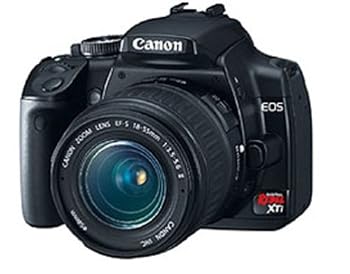
Jeff Keller at DC Resource has a review on the Canon Digital Rebel XTi SLR camera. Here's a roundup of his review.
Pros:
- Excellent photo quality
- Very low noise, even at high ISOs
- Dust reduction system
- Large 2.5" LCD display
- Full manual controls, including nice white balance controls
- Robust performance, especially in terms of continuous shooting
- Flash-based AF-assist lamp; very good low light focusing, even without using it
- Redeye not a problem
- Hot shoe for external flash
- Optional battery grip
- USB 2.0 High Speed support
- Capable RAW editor and remote camera control software included
Cons:
- Images on the soft side at default settings
- Small, hard to hold body; feels too "plasticky" in my opinion
- Below average battery life
- No spot metering
- No 2 second or custom self-timer (though mirror lockup is a workaround for the former)
Read user reviews
Find prices for the Canon Digital Rebel XTi SLR
Summary
While most owners of the Rebel XT probably won't run out to upgrade, the Canon Digital Rebel XTi (EOS-400D) is a most impressive entry-level digital SLR. It offers great photo quality and performance, plenty of features (most notably, a dust reduction system), a large LCD, and plenty of accessories. The main downside is its design: it's pretty small, not terribly easy to hold, and more "plasticky" than other D-SLRs. Despite that, the Rebel XTi earns my recommendation.
From most angles you won't be able to tell the Rebel XT and XTi apart -- the main differences can be found on the back of the camera. Canon has removed the LCD info display from the XT and instead put a larger 2.5" LCD that does double duty as an info display and a regular LCD. Some other design quirks about the XT weren't resolved on the XTi: I still think it's too small and difficult to hold comfortably. It also feels "plastic" compared to other entry-level cameras, especially the D80. Being a digital SLR, the Rebel XTi is expandable, with support for scores of EF and EF-S lenses, plus external flashes, remote controls, and a battery grip (to name just a few things).
The Rebel XTi has all the features you'd expect from a D-SLR, plus a few more. The XTi's resolution has been bumped up to 10 Megapixels, which is actually more than the "superior" EOS-30D -- I imagine a 40D can't be too far away. A more interested addition to the XTi is a dust reduction system, which attacks this annoyance from many angles (described earlier). In terms of shooting modes, you've got several scene modes, plus full manual exposure controls. While it won't let you set the color temperature, the XTi will let you do custom white balance, WB bracketing, and WB shift. Canon bundles a fairly complete software package with the camera, including a capable RAW editor and a remote capture program, both of which are options on the Nikon D80.
Camera performance was excellent in most respects. While the camera doesn't start up as quickly as some, it's due to the dust reduction system, and you can elect to skip this if you need to take a quick shot. The XTi focuses quickly, shutter lag isn't noticeable, and shot-to-shot speeds were snappy. The XTi can take 11 RAW or 33 Fine quality JPEGs in a row at just under 3 frames/second. About the only weak spot performance-wise is battery life, which is a bit below average.
Photo quality was excellent, especially with a decent lens on the camera (and the kit lens isn't one of those). The XTi took well-exposed, colorful images with very low noise levels, even at ISO 800. Like on all of Canon's D-SLRs, images are on the soft side straight out of the camera, and if you agree you can turn up the in-camera sharpening using the Picture Styles feature. Purple fringing levels varied depending on what lens I was using, but generally it wasn't a problem. Same goes for redeye -- there wasn't any to speak of.
There are just a few negatives that didn't fit in elsewhere. Like the other Rebel D-SLRs, there's no spot metering feature on the XTi. There isn't a custom or 2 second self-timer either, which is strange, since Canon's PowerShot cameras all have it. You can, however, use the mirror lockup option in the custom setting menu to accomplish this -- it's just a lot of work to do so.
And that's about it! Despite not being a big fan of its small size, I do like how the Rebel XTi performs, and it gets my highest recommendation.
Stuck between the Rebel XTi and the EOS-30D? If you need spot metering, manual color temperature control, and a better burst mode then you'll probably want to step up to the EOS-30D. If you have a Rebel XT and don't know what to do, I'd only suggest upgrading if you have had problems with dust getting on the sensor.
If you can't decide between the Rebel XTi and the Nikon D80 (and don't already own some of their respective lenses), that's a tougher question to answer. I much prefer the D80's design and build quality, but it is more expensive than the XTi. If you want that nicer body and a real LCD info display, then it may be worth spending more to get the D80. There's also the upcoming Pentax K10D, which offers a sealed, weatherproof body and image stabilization for around the same money. The bottom line is try as many of these cameras as you can, prioritize what features you require, and then make your own decision. I'm just here to help a little!
Read user reviewsFind prices for the Canon Digital Rebel XTi SLR
To read more, head over to the full review
Continue to read...
Thursday, January 3, 2008
Review: Nikon D40 Digital SLR Camera
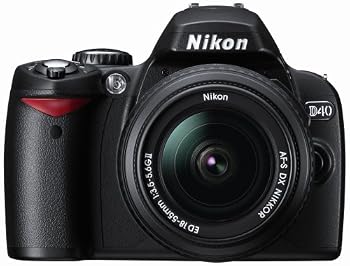
Digital Camera Resource has an in-depth review of the Nikon D40 Digital SLR camera. Here's just an extract. Their final verdict is "I strongly recommend trying the D40 and its competitors before you drop the big bucks on a D-SLR!"
Pros:
- Excellent photo quality; vivid colors and very low noise -- though see issues below
- Well built for its price
- Robust performance
- Large, bright, and sharp 2.5" LCD
- Shooting data well presented on the main LCD; settings can quickly be changed from the info screens
- Full manual controls
- Customizable menus and button
- Useful features for beginners like D-Lighting, red-eye removal, assist images, help system
- AF-assist lamp
- Redeye not a problem
- Above average battery life
- USB 2.0 High Speed support
- Purple fringing with kit lens; occasional blown highlights
- Limited selection of AF-S lenses means that many Nikkor lenses (mostly primes) will not support autofocus
- Grip could be larger
- No depth-of-field preview
- Included software doesn't allow for RAW image manipulation; Capture NX costs $150 more
- Would've been nice for assist images to be in full menu as well as quick menu
Find prices for the Nikon D40 Digital SLR.
Summary
With their new D40, Nikon has proven that you can make an entry-level digital SLR camera without cutting a lot of corners. There's a lot to like about this camera, from its compact size to its performance to its photo quality. For those ready to step up to the D-SLR world, the D40 is a fabulous way to do it.
The D40 is one of the most compact D-SLRs on the market, but it's not too small like the Canon Rebel XTi. Yeah, the grip is a little too small for my hands, but most people will find it to be acceptable (and better than the one on the Rebel). Build quality is also better than the Rebel, with higher grade plastics and an overall more solid feel. To cut down on the size of the camera, Nikon removed both the internal focus motor and LCD info display found on their other D-SLRs. The latter isn't a big deal, as Nikon did a nice job integrating shooting data onto the main LCD. You've got two views to choose from (I prefer the classic myself), and you can quickly change commonly used settings at the press of a button. The LCD itself is big, bright, and sharp. As for the lens motor issue, this really depends on how you plan to use the D40. If you'll be sticking to the kit lens and lenses like it, then you'll probably be fine. If you want throw on a 50 mm prime, then you'll probably want to get the Nikon D80 SLR instead, as it'll be manual focus only otherwise.
The D40 has a nice collection of point-and-shoot features, plus the full manual controls that you'd expect on a D-SLR. While the scene modes on the camera aren't necessarily new, the impressive in-camera help system is. When you use the "quick menu" to change settings, the camera shows "assist images" that tell you the situation for which you'd use that setting. There are also detailed help screens for every menu item -- even those confusing one in the custom settings menu. Add in the stuff in the Retouch menu like D-Lighting and redeye reduction and the D40 becomes the most user friendly D-SLR on the market. Power users don't need to worry, though -- the D40 has plenty of manual controls too. You've got the whole set of manual exposure controls, plus white balance and focus. The RAW (NEF) image format is supported, as well. The D40 lets you customize all the menus (showing only the options you want to see), and there's a custom button on the side of the camera as well. As far as expandability goes, the sky's the limit. You can choose from lenses, flashes, a wireless remote, and more.
Camera performance is superb. Flip the power switch and the D40 is ready to go. Focusing times were very good, and low light focusing was excellent thanks to a powerful AF-assist lamp. Naturally, shutter lag wasn't a problem, and shot-to-shot delays were minimal. The D40's continuous shooting mode isn't quite as fast as the one on the Rebel XTi, but it's still excellent, taking 6 RAW and a nearly infinite number of JPEGs at 2.5 frames/second. Battery life was above average, and the camera supports the USB 2.0 High Speed standard.
Photo quality was also very good. Nikon has tweaked the camera to produce what I'd call "consumer friendly" photos, with high color saturation and higher sharpness than on more expensive D-SLRs. Noise levels are very low, even at ISO 800. ISO 1600 is still usable, especially if you do some noise reduction in software. I'd probably save ISO 3200 for desperation only. I did run into a few photos with blown out highlights, though this is more a metering issue than anything. My main annoyance was the amount of purple fringing created by the kit lens -- more than I'd like to see. The camera had no redeye problem, but if it does come up, there's a removal tool built into the camera.
There are just a few negatives that I want to mention. First, while the camera supports the RAW image format, Nikon doesn't really give you any software to work with it, instead forcing you to get Capture NX or Photoshop. Second, while most D40 users won't care, there's no depth-of-field preview available. Lastly -- and this will sound like a petty complaint -- it would've been smart for Nikon to put those "assist images" in the full menu as well as the quick menu.
If you're ready to enter the world of digital SLRs, the Nikon D40 is a great way to do it. It offers a compact, truly portable body, great performance and photo quality, and a really user friendly interface for not a lot of dough. I can recommend the D40 without hesitation. I would say that the Canon Digital Rebel XTi is a somewhat more capable camera, but it also costs nearly $200 more. With that in mind, try both if you can, but don't think that you're giving anything up by getting the D40 -- you're not.
Read user reviews.
Find prices for the Nikon D40 Digital SLR.
You can read the rest of the review at Digital Camera Resource.
Continue to read...
Wednesday, January 2, 2008
Review: Canon PowerShot A570 IS
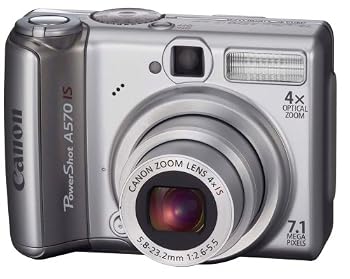
Mike Pasini at Imaging Resource brings us an in-depth review of the Canon PowerShot A570 IS digital camera.
He concludes that "if you want a compact digicam that can take pictures like a real camera, this is an easy pick!"I've included a video review from TigerDirect at the end of this post.
Read user reviews.
Find prices for the Canon PowerShot A570 IS.
Pros:
- Image stabilizer
- Face detection focus mode (which defaults to 9-point AF if no faces are found)
- Natural color without high contrast and oversaturation
- Custom assignment of Print/Share button
- Auto fine focus after manual focus
- Flash power is adjustable
- Optical viewfinder
- Very good high ISO performance
- Accepts conversion lenses
- Broadcast quality movies
- AA batteries for power
- Canon insists on supplying documentation in two booklets, a Basic User Guide and an Advanced User Guide, making it a pain to look anything up
- Low resolution LCD
- Slow flash recycle time
- Stiff Mode dial
Description
The Canon PowerShot A570 IS digital camera that has a resolution of 7.1 megapixels, and is coupled to a Canon-branded 4x optical zoom lens with image stabilization achieved by moving elements in the optical path. (True "optical image stabilization.")
The Canon A570 IS body includes a 2.5 inch LCD display with a fairly average 115,000 pixel resolution, along with a real-image optical zoom viewfinder. Other Canon A570IS features include 35mm-equivalent focal lengths ranging from 35 to 140mm, a maximum aperture that varies with focal length from f2.6 at wide-angle to f5.5 at telephoto, nine-point autofocusing, a maximum ISO sensitivity of 1600, three metering modes (evaluative, center-weighted average, and spot), seven white balance modes, plus custom mode, and 12 scene modes.
The A570 IS offers a useful 30 frames-per-second VGA (640x480) video mode with sound in AVI (Motion JPEG) format, and supports SDHC as well as SD/MMC memory cards. The PowerShot A570IS is powered by two AA batteries, and interfaces include USB 2.0 (high-speed), and A/V (NTSC, or PAL) connections.
Introduction
As popular as Canon's compact SD digital ELPHs are, they don't offer full manual control over the exposure parameters. For that sort of fun, Canon digicam fans fortunately have the A series. And recently Canon has been updating the A series with image stabilization to add to the thrills.
The ELPHs have always had a bit more style than the A series, too, standing on end and packing a small lith-ion battery. But the retro-looking A series, using commonly available AA-sized batteries, offers a grip you can get your hands on.
And when it comes to the features a photographer looks for, the A series doesn't disappoint. The A570 IS in particular has a lot to offer: Manual mode, Aperture and Shutter Priority modes, a good grip, high ISO and image stabilization, and variable power flash (so you can shoot fill flash).
Not to mention image quality. My shots with Canon digicams continue to be among the most accurate and sharpest images I've taken with a digicam. If you're wondering which brand to buy, you won't go wrong with most any Canon model. And if you want more control than the ELPHs offer, take a look at the A series. The A570 IS with its affordable optical image stabilization would be a great place to start your investigation.
Design
The Canon A570 IS body style is retro. Silver only, with an optical viewfinder and a big grip, you feel like you've seen it before. It's boxy rather than slim, but it's also more comfortable to hold and shoot with than typical credit-card sized cameras.
Weighing just 8.32 ounces with two AA batteries and an SD card installed, it won't make your jacket hang unevenly, but it has enough heft that when you press the Shutter button you won't shake the camera.
The grip is part of the reason, certainly. You can get your fingers comfortably around the battery compartment of the A570 IS for a stable shooting platform. Your index finger is free to toy with the Shutter button or Zoom Lever surrounding it. Your thumb sits over the speaker grill on the back panel, just off the main control panel.
The controls themselves will be familiar to Canon fans, with the same Menu and Function/Set dedicated button arrangement of other recent Canon digicams, if slightly rearranged (as always). But one thing I particularly appreciated was the ability to assign one of several custom functions to the Print/Share button that is otherwise unused in Record mode. You can assign ISO, White Balance, Teleconverter, Display Overlay, or Display Off to it.
Display / Viewfinder
Another aspect of the Canon A570 IS that helps it stand out from the crowd is its optical viewfinder, an increasingly rare feature, especially as LCD become larger and larger on smaller and smaller digicams.
The A570 IS doesn't compromise here, although the viewfinder itself can't show off features like the 16:9 wide screen aspect ratio or the effect of image stabilization like the 2.5 inch LCD can. It can, however, be seen in sunlight, which is surprisingly difficult with most modern LCDs. And it won't reflect your bright Hawaiian shirt or pastel blouse like many of them do, too. I've often had an impossible time trying to use and LCD to frame my zoom range sample images from Twin Peaks with the sun on my right. An optical viewfinder is a welcome relief from that losing battle.
The LCD itself does not have as high a resolution as many modern LCDs, but it's detailed enough to check your exposure and read the menus. The 115K pixels are one reason the price on this unit is so attractive, so I won't complain.
Performance
In its class, the Canon A570 IS scores above average marks on the things that really matter: startup, shutdown, autofocus shutter lag, prefocus lag, shot-to-shot cycle time, download speed, LCD size and weight. Its 4x optical zoom and 10 second flash recycle time are average, but a long flash recycle time usually indicates a powerful flash and a 4x zoom certainly beats the 3x zooms common in this category.
While the shot-to-shot cycle time was above average, continuous mode shooting was a little sluggish, showing the captured image briefly before snapping the next shot if you hold the Shutter button down. This is another situation in which I was glad to have the optical viewfinder. Otherwise, I'd never have been able to compose the shots when working in continuous shooting mode.
I'll have more to say about image stabilization in the next section, but it's really hard to recommend a camera without it these days. By effectively giving you two to three more stops of light to play with and avoiding the atrocious effects of on-camera flash, it pays dividends you don't appreciate it until you use it. You really don't need a long zoom lens to need image stabilization. And Canon's implementation is excellent.
I've never really grasped the Canon hierarchy of Scene modes. Yes, things like Portrait and Landscape are common enough to have their own Mode dial settings, while Aquarium and Underwater are special situations. But I'm not a big user of Scene modes anyway.
I am a big user of PASM (Programmed auto exposure, Aperture priority, Shutter Priority or full Manual exposure), however, or what Canon calls the Creative Zone. Being able to control either the shutter speed or aperture or both is a big deal to me and I've been sad to see that basic functionality disappear on many digicams. Hurray to Canon for making it available on many of their PowerShots.
It is a little confining to only be able to stop the lens down to f8.0 but a small sensor, apparently, permits no more. (With small sensors, smaller apertures will only result in soft-looking photos.) I planted myself on the beach and tried to take a shot of some tall grass being buffeted by the wind. I could stop the action at 1/500 second at f5.0, but f8.0 didn't give me a slow enough shutter speed at ISO 80 to capture the grass in motion.
Canon image quality is legendary and I always find it a pleasure to pick my gallery shots for these reviews when I've shot them with a Canon. The color is natural and the detail superb. There just isn't the oversaturation or high contrast that kills so many shots taken by otherwise impressive digicams.
That matters in a shot like the angel trumpets in shadow over the field of poppies in the sun shown below left. There's a tension there -- heightened when you realize the exotic trumpets are poisonous and the poppies a state flower -- that is almost operatic. The poppies are at the edge of brightness, lit from the back, the tweeters in the orchestra. And the trumpets are fading into the darkness, deep brass bass booming the doom to come.
Much as I dislike shooting with flash on a digicam, there are times you need it. The recycle time of the Canon A570IS was slow, a little surprising in a normal-sized model with average flash range. Canon kicks the ISO up to 200 to get coverage of 11 feet at wide angle and 7.2 feet at telephoto. That's not much of a stretch in ISO and covers most indoor use with its range.
Movie mode was great fun, too. At 640x480 and 30-fps, the A570 IS delivers "broadcast quality" video. Despite having a 16:9 still aspect ratio, however, you have to shoot all video in 4:3, compatible with conventional standard-definition TV sets.
I did have one unusual issue with this particular model. It went through batteries in just a few shots. I believe the battery door itself was defective because opening it and closing it again usually resolved the low power indication (which shuts off the camera). And there was a little play in the door, too. This kind of thing happens on review samples, so it may not be a problem in fresh-from-the-box retail units, but fair warning.
The controls are convenient and easy to use. Canon tends to move the buttons around from model to model and functions seem to shift around a lot, too. But once you get the idea, you won't need the manual. The concept is that the Menu button takes you to once-in-a-while settings (including the Setup options), while the Function button gets you to settings that might change from scene to scene. The external buttons themselves have the functions you might switch from shot to shot. On the A570 IS, you can actually program the Print/Share button to be one of the latter, a very nice touch.
I should point out that the Mode dial was unusually stiff, requiring quite an effort to click it from one mode to another. That's not something you do a lot, but it shouldn't be this much work.
Shooting
Image stabilization is one of the wonders of modern photography. Your hand normally shakes enough to make a shutter speed like 1/30 chancy. But "chancy" drops to 1/4 second with image stabilization. No need for flash, no need for high ISO (and the noise that high ISO entails on a small digicam sensor). And, yes, a sharp, detailed shot. In fact, you'll get photos unlike any you've ever taken before without image stabilization.
Image stabilization has long been appreciated with long zooms where the 10x focal lengths are impossible to hand hold, but I find myself relying on it even at shorter focal lengths, in light that does not invite photography. The only time I turn it off is when I use a tripod or sturdy support.
Canon believes image stabilization should happen in the lens, where an optical element can float to compensate for movement. That means more expense for Canon dSLR fans, who will have to buy IS lenses instead of a body with the technology built in. But that approach is no issue for digicam buyers, where the design makes lens and body inseparable.
I expanded my usual doll shot into a series to show off Canon's excellent implementation of image stabilization. I first shot a normal shot like you'd take with any digicam in Auto mode with Auto ISO and no IS -- just to show you what normal looks like. Very blurry at ISO 200, as expected. Then I switched just ISO to Auto High ISO, so the camera would stretch a little and at ISO 800 it's sharper if not sharp at 1/5 second. Then I manually walked through the ISO settings at 800 and 1600 without IS. Even at 1600, I needed a shutter speed as slow as 1/13, though, well below my hand held limit of 1/30. It's sharper than the Auto High ISO shot and the color is still quite good, although there's certainly more noise.
Then I switched IS on and reshot at ISO 400, 800 and 1600 with shutter speeds chosen by the camera of 1/3, 1/7 and 1/10 second. Of these only the 1600 at 1/10 second is sharp (you can see the painted eyebrows and eyelashes clearly) with good color, too. You have to examine the full-size images to see this (and they are full resolution even at 1600), so if you're shooting low resolution for the Web or email only, the news is even better.
Couple this with Macro mode (using the Full Exif Display links on the sample-image pages, look in the Focus Range setting for "Macro") and you can enjoy close-up shooting without worrying about artificial light. The shot of stick shift knob at 1/26 second below is one example, but so is Santa at ISO 1600 (the last shot in the gallery).
Digital zoom is another feature that's unevenly implemented. Some manufacturers do it well (giving you the choice of upsampling to full resolution or cropping to a smaller size with enough detail to make large prints). Others just don't. In the Full Exif Display, the DigitalZoom tag shows the amount of digital zoom used in any of the gallery images.
Canon upsamples and detail suffers. With 7.1 megapixels to play with, I'd prefer a 3-megapixel image (good enough for enlargements) without the upsampling. In fact, downsampling the image again (or just printing it smaller) helps restore it a bit. But I wouldn't avoid using digital zoom on the A570 IS. It certainly delivers credible results, just a notch down in detail.
Conclusion
The Canon A570 IS stands out for its usable ISO as high as 1600 (for small prints, at least) and excellent image stabilization so useful you'll always want it active. Considering you get that for just $50 over the price of the quite similar A560, it's a bargain, too.
Digital zoom was a bit of a disappointment on this 7.1-megapixel camera, but otherwise the DIGIC III image processor provided above average performance yielding some wonderfully natural shots in a variety of settings. Movie mode can deliver broadcast quality video in a 4:3 aspect ratio while still mode a offers 16:9 wide screen option I find a lot of fun.
Operation is straightforward once you learn Canon's hierarchy of controls, but I was delighted to see a programmable Print/Share button on the A570 IS. That made up a little for the stiff Mode dial. And, who knows, if you keep changing how you define the button, you may qualify to work for Canon's user interface group.
From the optical viewfinder to the manual modes, whenever I looked for a feature a photographer would appreciate, I found it on the A570 IS. There isn't the gaudy LCD (with no room for a viewfinder) or extravagant zoom range (with big compromises in optical quality) or any of the frills (frames, in-camera presentations) of many less capable digicams. But if you want a compact digicam that can take pictures like a real camera, this is an easy pick.
Read user reviews.
Find prices for the Canon PowerShot A570 IS.
Source: Imaging Resource
Continue to read...
10 Digital Photography Tips
Derrick Story gave us some timeless advice in an article he wrote 4 years ago. It still makes great reading, and anyone should be able to benefit from his advice. While digital camera technologies have advanced dramatically, the camera man might not have! Read on... You've heard this before: "Digital cameras do all the work. You just push the button and great pictures magically appear. The better the camera, the better the photos." Isn't that right? Heck no! The truth is that you can make great photos with a simple consumer point-and-shoot camera, or take lousy shots with the most expensive Nikon. It's not the camera that makes beautiful images; it's the photographer. With a little knowledge and a willingness to make an adjustment here and there, you can squeeze big time photos out of the smallest digicam. To help you down the road to great image making, here are ten tips that will enable you shoot like a pro (without maxing out your credit card on all that expensive equipment). 1. Warm Up Those Tones Have you ever noticed that your shots sometimes have a cool, clammy feel to them? If so, you're not alone. The default white balance setting for digital cameras is When shooting outdoor portraits and sunny landscapes, try changing your white balance setting from If you don't believe me, then do a test. Take a few outdoor shots with the white balance on 2: Sunglasses Polarizer If you really want to add some punch to your images, then get your hands on a polarizing filter. A polarizer is the one filter every photographer should have handy for landscapes and general outdoor shooting. By reducing glare and unwanted reflections, polarized shots have richer, more saturated colors, especially in the sky. What's that you say? Your digital camera can't accommodate filters. Don't despair. I've been using this trick for years with my point-and-shoot cameras. If you have a pair of quality sunglasses, then simply take them off and use them as your polarizing filter. Place the glasses as close to the camera lens as possible, then check their position in the LCD viewfinder to make sure you don't have the rims in the shot. For the best effect, position yourself so the sun is over either your right or left shoulder. The polarizing effect is strongest when the light source is at a 90-degree angle from the subject. 3. Outdoor Portraits That Shine One of the great hidden features on digital cameras is the In After you get the hang of using the flash outdoors, try a couple variations on this theme by positioning the subject so the sun illuminates the hair from the side or the back, often referred to as rim lighting. Another good technique is to put the model in the shade under a tree, then use the flash to illuminate the subject. This keeps the model comfortable and cool with no squinty eyes from the harsh sun, and this often results in a more relaxed looking portrait. Remember, though, that most built-in camera flashes only have a range of 10 feet (or even less!), so make sure you don't stand too far away when using fill flash outdoors. 4. Macro Mode Madness Remember as a kid discovering the whole new world beneath your feet while playing on the grass? When you got very close to the ground, you could see an entire community of creatures that you never knew existed. These days, you might not want to lie on your belly in the backyard, but if you activate the Even the simplest object takes on new fascination in Just look for the Keep in mind that you have very shallow depth of field when using the 5. Horizon Line Mayhem For some mysterious reason, most human beings have a hard time holding the camera level when using the LCD monitors on their digicams. The result can be cockeyed sunsets, lopsided landscapes, and tilted towers. Part of the problem is that your camera's optics introduce distortion when rendering broad panoramas on tiny, two-inch screens. Those trees may be standing straight when you look at them with the naked eye, but they seem to be bowing inward on your camera's monitor. No wonder photographers become disoriented when lining up their shots. What can you do? Well, there's no silver bullet to solve all of your horizon line problems, but you can make improvements by keeping a few things in mind. First of all, be aware that it's important to capture your images as level as possible. If you're having difficulty framing the scene to your liking, then take your best shot at a straight picture, reposition the camera slightly, take another picture, and then maybe one more with another adjustment. Chances are very good that one of the images will "feel right" when you review them on the computer. Simply discard the others once you find the perfectly aligned image. If you practice level framing of your shots, over time the process will become more natural, and your percentage of level horizon lines will increase dramatically. 6. Massive Media Card When you're figuring out the budget for your next digital camera, make sure you factor in the purchase of an additional memory card. Why? Because the cards included with your new high-tech wonder toy are about as satisfying as an airline bag of peanuts when you're dying of hunger. If you have a 3 megapixel camera, get at least a 256MB card, 512MBs for 4 megapixel models, and 1GB for for 6 megapixels and up. That way you'll never miss another shot because your memory card is full. 7. High Resolution All the Way One of the most important reasons for packing a massive memory card is to enable you to shoot at your camera's highest resolution. If you paid a premium price for a 6 megapixel digicam, then get your money's worth and shoot at 6 megapixels. And while you're at it, shoot at your camera's highest quality compression setting too. Why not squeeze more images on your memory card by shooting a lower resolution and low quality compression settings? Because you never know when you're going to capture the next great image of the 21st century. And if you take a beautiful picture at the low 640 x 480 resolution, that means you can only make a print about the size of a credit card, not exactly the right dimensions for hanging in the museum. On the other hand, if you recorded the image at 2272 x 1704 (4 megapixels) or larger, then you can make a lovely 8- x 10-inch photo-quality print suitable for framing or even for gracing the cover of Time magazine. And just in case you were able to get as close to the action as you had liked, having those extra pixels enables you to crop your image and still have enough resolution to make a decent sized print. The point is, if you have enough memory (and you know you should), then there's no reason to shoot at lower resolution and risk missing the opportunity to show off your work in a big way. 8. Tolerable Tripod I once overheard someone say, "He must be a real photographer because he's using a tripod." Well, whether or not you use a tripod has nothing to do with you being a true photographer. For certain types of shots though, these three-legged supports can be very useful. The problem is tripods are a pain in the butt to carry around. They are bulky, unwieldily, and sometimes downright frustrating. Does the phrase "necessary evil" come to mind? For digital shooters there's good news: the UltraPod II by Pedco. This compact, versatile, ingenious device fits in your back pocket and enables you to steady your camera in a variety of situations. You can open the legs and set it on any reasonable flat surface such as a tabletop or a boulder in the middle of nowhere. But you can also employ its Velcro strap and attach your camera to an available pole or tree limb. You might not need a tripod that often, but when you do, nothing else will work. Save yourself the pain and money of a big heavy lug of a pod, and check out the svelte UltraPod. Yes, then you too can be a real photographer. 9. Self Timer Fun Now that you have your UltraPod in hand, you can explore another under-used feature found on almost every digital camera: the Hey, just because you've been donned as the creative historian in your clan, that doesn't mean that your shining face should be absent from every frame of the family's pictorial accounting. You could hand your trusty digicam over to strangers while you jump in the shot, but then you take the chance of them dropping, or even worse, running off with your camera. Instead, attach your UltraPod, line up the shot, activate the Self timers are good for other situations, too. Are you interested in making long exposures of cars driving over the Golden Gate Bridge at dusk? Once again, secure your camera on a tripod, then trip the shutter using the self timer. By doing so, you prevent accidental jarring of the camera as you initiate the exposure. 10. Slow Motion Water I come from a family where it's darn hard to impress them with my artsy pictures. One of the few exceptions happened recently when my sister commented that a series of water shots I had shown her looked like paintings. That was close enough to a compliment for me. What she was responding to was one of my favorite types of photographs: slow motion water. These images are created by finding a nice composition with running water, then forcing the camera's shutter to stay open for a second or two, creating a soft, flowing effect of the water while all the other elements in the scene stay nice and sharp. You'll need a tripod to steady the camera during the long exposure, and you probably should use the self timer to trip the shutter. If you camera has an aperture priority setting, use it and set the aperture to f-8, f-11, or f-16 if possible. This will give you greater depth of field and cause the shutter to slow down. Ideally, you'll want an exposure of one second or longer to create the flowing effect of the water. That means you probably will want to look for streams and waterfalls that are in the shade instead of the bright sunlight. Another trick is to use your sunglasses over the lens to darken the scene and create even a longer exposure. Plus you get the added bonus of eliminating distracting reflections from your composition. Most digital cameras, even the consumer point-and-shoot models, have a tremendous amount of functionality built into them. By applying a little ingenuity and creativity, you can take shots that will make viewers ask, "So what kind of camera do you have?" You can tell them the answer, but inside, you'll know it's not the camera responsible for those great pictures. It's the photographer.auto, which is fine for most snapshots, but tends to be a bit on the "cool" side. auto to cloudy. That's right, cloudy. Why? This adjustment is like putting a mild warming filter on your camera. It increases the reds and yellows resulting in richer, warmer pictures.auto, then take the same picture again with the setting on cloudy. Upload the images to your computer and look at them side by side. My guess is that you'll like the warmer image better.fill flash or flash on mode. By taking control of the flash so it goes on when you want it to, not when the camera deems it appropriate, you've just taken an important step toward capturing great outdoor portraits. flash on mode, the camera exposes for the background first, then adds just enough flash to illuminate your portrait subject. The result is a professional looking picture where everything in the composition looks good. Wedding photographers have been using this technique for years.close up mode on your digital camera and begin to explore your world in finer detail, you'll be rewarded with fresh new images unlike anything you've ever shot before. macro mode. And the best part is that it's so easy to do with digital cameras.close up or macro mode icon, which is usually a flower symbol, turn it on, and get as close to an object as your camera will allow. Once you've found something to your liking, hold the shutter button down halfway to allow the camera to focus. When the confirmation light gives you the go ahead, press the shutter down the rest of the way to record the image. close up mode, so focus on the part of the subject that's most important to you, and let the rest of the image go soft.self timer. This function delays the firing of the shutter (after the button has been pushed) for up to 10 seconds, fixing one of the age old problems in photography: the missing photographer.self timer, and get in the picture. This is usually a good time to turn on the flash to ensure even exposure of everyone in the composition (but remember that 10 foot flash range limit!). Also, make sure the focusing sensor is aimed at a person in the group and not the distant background, or you'll get very sharp trees and fuzzy family members.
Continue to read...
How Many Megapixels Does My Digital Camera Need?
There is a great tutorial over at Digital Camera Buying Guide that helps you decide if your digital camera has too many Megapixels for your needs. More Megapixels results in higher costs and larger files, so you might be spending more than you need to. Megapixels is especially important when you need to print your photos, less so if you're only viewing online.
From the tutorial, "Digital camera resolution is measured in Megapixels. One Megapixel is made of one million pixels/dots. The more Megapixels - the higher the resolution the better quality of the photograph. Therefore when buying a digital camera, resolution is one of the most important things you need to take into account. Obviously if you're not going to print your pictures you need not worry about digital camera resolution that much but still you shouldn't go under one Megapixel."
They have a very handy chart that tells you how many Megapixels is enough for each type of print, so head over there and check it out.
Continue to read...
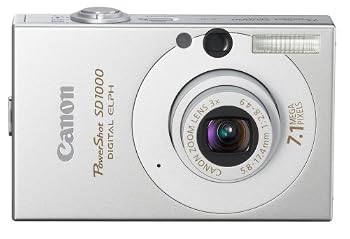
Review: Canon PowerShot SD1000 Digital ELPH
The good:
- Excellent image quality
- Solid build quality
- Speedy performance
- Optical viewfinder
- Face detection
The bad:
- No manual exposure controls
The bottom line: Small size, excellent image quality, and a solid, though not extensive, feature set make the SD1000 a great choice for a compact digital camera.
Read user reviews.Find prices for the Canon PowerShot SD1000 Digital ELPH.
Last year marked the 10th anniversary of Canon's Elph cameras. The line started with a film camera, though the company's SD line of digital compacts still carries the Digital Elph moniker. Despite its four-digit number, Canon positions the PowerShot SD1000 as a replacement for last year's PowerShot SD600, which also puts it below the new PowerShot SD750 in the company's line. Resolution has been bumped up to 7.1 megapixels from the SD600's 6MP, but despite an almost identical controls layout (though different cosmetic design), Canon made a few changes on the inside.
The most noticeable internal change is the switch to the new Digic III processor. Canon says it enables longer battery life, faster startup, autofocus, and shutter response (we call this shutter lag). Plus, the processor adds enough number-crunching power to add face detection, red-eye reduction (in playback mode), and lets the SD1000 reach further heights of sensitivity--in this case ISO 1600. To Canon's credit, we did see some performance improvements over the SD600 (see our performance paragraph below for more).
While cosmetic differences abound, the SD600 and SD1000 actually have very similar control layouts. Canon places all buttons on the right half of the body. A slider lets you switch between still image capture, video recording, and playback. Other than three dedicated buttons, for Menu, Display, and Direct Printing, the only other control is the circular four-way rocker with a Function/Set button in the middle. We found the four-way rocker somewhat difficult to use. Since it's recessed and the rocker's ring isn't all that wide, on a number of occasions we hit the Function/Set button when we meant to hit the rocker.
The SD1000's new cosmetic look harkens back to the original Elph with the big black circle around its lens, but drew mixed reactions from the people to whom we showed our sample. Some were turned off by the overall boxy shape, though just as many admired the tiny, simple shape. Likewise, about half felt the look was too retro, while the other half admired the throwback design. If you don't like the black-on-silver design, Canon also offers a silver-on-silver version.
To date, Canon hasn't seen fit to include manual exposure controls in any of the cameras in the Digital Elph line, and the SD1000 continues this trend. On one level, it makes sense, since the target audience for these compacts is snapshooters who often don't know an f-stop from a shutter speed. While we can't hold this against Canon (its competitors do the same thing), with more and more pros and advanced shooters looking for pocketable back-up cameras, it might be time to broaden the scope of these models. Fourteen scene modes help you tackle specific situations, such as portraits, fireworks, and snowy scenes. Some of these appear in the main function menu, but Canon makes you press the menu button again to see them all. In addition to scene modes, there's also a full auto mode, as well as a mode marked manual, which lets you choose certain options, such as exposure compensation, white balance, and metering mode (evaluative, center weighted, or spot).
Covering an equivalent range of 35mm to 105mm, with a maximum aperture range of f/2.8 to f/4.9, this camera's 3X optical zoom lens is on par with the competition. However, we saw very little colored fringing in our test images, which leads us to believe it probably has higher quality glass than some compacts. The 2.5-inch LCD screen has a special coating intended to prevent glare, scratches, and fingerprints. We saw very little glare, but plenty of fingerprints. Thankfully, these were easily wiped away, though you'll probably want to carry a small microfiber cloth with you if smudges bother you. We were pleased to see that Canon still includes an optical viewfinder. Even if it is tiny and tunnel-like, it'll still come in handy in those situations when you've got your back to the wall, or you don't want the light from the LCD to bother others.
Performance was relatively speedy in our tests. The PowerShot SD1000 took 0.98 second to start up and capture its first JPEG. Subsequent JPEGs took 1.48 seconds between shots with the flash turned off and 2.44 seconds with the flash enabled. Shutter lag measured 0.45 second in our high-contrast test, which mimics bright shooting conditions, and 0.9 second in our low-contrast test, which mimics dim shooting conditions. Continuous shooting wasn't quite as fast as its 6MP predecessor. We measured approximately 1.7 frames per second regardless of image size. Canon's face detection system quickly and accurately detected most of the faces we tried. It seems to rely largely on eyes, as it got slightly confused when one of our lovely models closed hers.
Image quality from the PowerShot SD1000 was excellent in our tests, with accurate colors and plenty of sharpness. The camera's automatic white balance yielded slightly yellowish images with our test lab's Tungsten lights, though the Tungsten white balance preset compensated, producing very neutral colors. Canon keeps noise well under control from ISO 80 through ISO 200, though the company's noise reduction algorithms seem to pull out a minute amount of sharpness at ISO 200. At ISO 400 noise becomes more apparent, manifesting as a light covering of mostly bluish, off-color speckles. ISO 800 brings significantly more noise, though images may be usable for smaller prints (4x6 inch). However, a large amount of sharpness, along with a hefty amount of shadow detail is lost at this setting. ISO 1600 looks like shooting in a snow storm. At this top setting, sharpness becomes a distant fantasy and shadow detail rescinds into another inaccessible dimension. We suggest staying below ISO 800 whenever possible and don't suggest using ISO 1600 at all. Of course, that still puts this camera on par, or better, compared with its competition in terms of ISO noise.
Despite our minor gripes, the PowerShot SD1000 is a top-notch compact camera for its price range. Most users will be pleased with its excellent image quality and the useful, if not extensive, feature set. The most significant feature you won't find here is optical image stabilization, though at this price, you'd be hard pressed to find it elsewhere while maintaining a decent level of image quality at the same time.
Read user reviews.
Find prices for the Canon PowerShot SD1000 Digital ELPH.
Source: Cnet
Continue to read...
How to Choose a Digital Camera Battery
Every device needs a driving force to operate, just as every living thing needs a heart to keep it alive! Basically electric power does this job for any kind of devices nowadays. Similarly for any digital camera too, a good battery is necessary in order to ensure an excellent performance from it as long as possible. Being such a crucial task as if searching for a good heart for a human being, perhaps the most tedious thing about digital cameras is the quest for their battery consumption and thereby finding a suitable one for any particular one. Yet a basic overview regarding this so important component of a digital camera makes the ventures of the users somewhat less complicated and makes life easier with a proper selection of the battery!
Leaving aside the ever power thirsty LCD screens and flashes, the digital cameras themselves exhaust batteries much faster than film cameras, due to their state of the art electronic designs and intricate circuitry. Many digital cameras run from AA cells, around 4, and can even drain a set of alkaline cells in less than 1 hour of working! For example, the Kodak DC120 draws about 210mA during start or switch ON, but progresses to around 1.3A with the association of the LCD fully working and can go ahead to about 2.1A while picture taking and after it too.
With all these nightmares regarding the batteries of the digital cameras, it is worthwhile to analyze and reveal some of the available batteries for the digital cameras in an effort to explore area of power consumption in this fantastic device.
Lithium Ion
Li-ion (Lithium Ion) battery is one of the latest cell types available to digital camera users. This has many advantages to its credit. It is light in weight and currently available for many commercial uses and thus being so the Li-ion battery type is becoming quite popular. This has an added advantage of being able to endow with more power than any of the other main cell types available. It is also free from the problems of memory effect, hat some battery types do have, and maintenance is least in this type of battery. These are but real goodies about this Li-ion battery. Yet it has one major disadvantage, that is, the price is usually significantly higher than conventional batteries, due to its sophisticated design and technology.
Nickel Metal Hydride
Coming to the next one in the line, the NiMH (Nickel Metal Hydride). This is a battery that is perhaps the most frequently under use for not only digital cameras, but also for other sophisticated devices like laptop computers! This has the advantage of being cheap in price due to the fact that it incurs cheap manufacturing costs, and thus a choice for many users! But this does have the problems of memory effect, and much more maintenance and care is required while handling this kind of battery.
Nickel Cadmium
Another such battery is the NiCAD (Nickel Cadmium) Battery. This is perhaps belonging to one of the older cell types generally available for older laptops and electronic devices. These batteries or cells have an aptitude for handling high power loads, and therefore is more frequently found in handy power tools and devices that require more amounts power to work efficiently and perfectly. Yet again, these batteries too have the problems of memory effect, and much more maintenance and care is required while handling this kind of battery.
Apart from the different batteries themselves, the selection should be based upon the charging techniques and the different charges available for all these digital camera batteries. Latest batteries come handy with charging free techniques too! So care needs to be taken in this area also, depending upon the requirements of the user.
With all the vivid conversation regarding the hearts of the digital cameras, their batteries, it is expected for every person going through the lines to have grabbed a significant amount of information in dealing with the intricacies of the purchase, and thereby also augment the ability of the person in using such a sophisticated device as a digital camera with a proper battery!
About the author
Jakob Jelling is the founder of http://www.snapjunky.com. Visit his digital camera guide and learn how to take better pictures with your digicam.
Continue to read...
Tuesday, January 1, 2008
Review: Olympus E-510 Digital SLR

The folks at DPExperts have a nice review on the Olympus E-510 digital SLR.
Their one-word verdict is "Excellent"!
The low-down: This digital single lens reflex is built around the Four Thirds system of sensor (10 megapixels) and lens, pioneered by Olympus. The camera has “live view”, meaning that the LCD screen can be selected as the viewfinder – and the implementation on the E-510 is an improvement over the earlier versions on the 300 series cameras. There is no body-top camera status LCD, and the viewfinder is not the brightest, but over all construction quality is good. The camera is smaller and lighter than the competition and the kit lens (28‑84mm film equivalent) is very light indeed. There is in-body image stabilisation and auto sensor cleaning when the camera is turned off.
Like: The image quality is excellent. Pictures are sharp and detailed which is probably partly due to the sensor being smaller than on other DSLRs, because a smaller sensor tends to give greater depth of field at any given focal length. We liked the consistency of image quality, including focus, resolution and colour. We found no bleeding in areas of solid colours and detail was well preserved even in red and yellow patches. On board flash performance is good.
Dislike: Auto white balance is not reliable in some situations, such as late afternoon light. The viewfinder is really dim, and we are not convinced that removing camera status indicators from the body top is a good move. No doubt it saves money, and the LCD information read-out is comprehensive and gives easy access to most camera settings, but we’ve got used to status screens on top.
Verdict: This is a camera we would recommend to anyone who wants the image quality of a good SLR without having to think too much. It’s light weight will also appeal. And now that Panasonic/Leica is in the Four Thirds camp there should be some cheaper third party lenses coming onto the market. Olympus have fitted a CF card slot as well as their own xD slot, which makes sense because CF cards are cheaper and available everywhere.
Read user reviews.
Find prices for the Olympus E-510 Digital SLR
Continue to read...
Review: Canon PowerShot SX100 IS
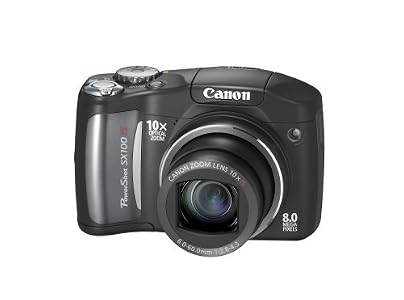
Michael Tomkins at Imaging Resource has a delightful review on the new Canon PowerShot SX100IS .
He concludes that "Overall, the Canon PowerShot SX100IS is an enjoyable, versatile, and very well thought-out digital camera. A truly powerful zoom lens really frees you to get close to action you might otherwise have missed, and optical image stabilization ensures that when you do, the shots won't be a blurry mess. A range of manual controls and options ensure there's room to grow into the camera's capabilities as your experience increases, but simple presets and auto functions make sure that beginners can still get the shot without needing to understand camera jargon. Image quality, with the exception of some noise related issues, is generally great, with good color and exposure metering, and the ability to tweak output to your tastes. Face detection -- the must have feature for 2007 -- is implemented nicely in a way that genuinely helps improve your pictures without getting in your way, and the face select function in playback mode can really speed checking your images once you're familiar with how it works. You won't fit the Canon SX100 IS in most pockets, but it's still compact enough that it won't get left at home collecting dust. Battery life is excellent, and pricing is affordable as well. If you're in the market for a long-zoom digicam, the Canon PowerShot SX100 IS is definitely worthy of consideration."
Read user reviews.
Find prices for the Canon PowerShot SX100 IS
Continue to read...
